Internal Linking Audit: How to Improve Site Structure Without Guessing
Plain-English guide for small business owners to audit internal links, fix orphan pages, and build a site structure that helps customers and search engines.
# Internal Linking Audit: How to Improve Site Structure Without Guessing
Most small business websites grow the way a kitchen junk drawer grows. You add a service page here, a blog post there, a landing page for a promo you ran two years ago. Nobody plans it. Then one day someone asks why your site isn't ranking for the thing you actually sell, or why customers keep emailing questions that are answered on page 14 of your blog.
The answer is usually internal linking.
Internal links are the connections between pages on your own site. They tell visitors where to go next, and they tell search engines which pages matter most. Done poorly, your best pages get buried. Done well, your site basically works for you.
This guide walks through how to audit your internal linking the way a small business owner actually has time to do it, not the way a 12-person SEO agency would.

Why internal linking matters more than you think
Search engines find your pages by following links. If a page on your site has zero internal links pointing to it, search engines have a much harder time finding it, crawling it, and deciding whether it's worth showing in results. Those are called orphan pages, and almost every site I've looked at has a few.
Internal links do four jobs at once:
- They distribute attention. A page linked from your homepage is treated as more important than one buried five clicks deep.
- They give context. The words you use to link to a page (the anchor text) tell search engines what that page is about.
- They help customers. A visitor who can't find your pricing page leaves. A clear path to it from every service page keeps them moving.
- They reduce dead ends. Every page should give the reader somewhere reasonable to go next, or they go back to Google.
Google's guidance on creating helpful content emphasizes that sites should be organized so people can find what they need. That's not a vague suggestion. That's the entire job of internal linking.
What an internal linking audit actually looks at
An audit isn't mystical. You're checking four concrete things:
- Pages with no internal links pointing to them. (Orphan pages.)
- Links pointing to pages that no longer exist. (Broken internal links.)
- Whether your most important pages get enough internal links. (Link distribution.)
- Whether the structure matches how a customer thinks about your business. (Information architecture.)
Each has a fix. None require code. Most can be done in a spreadsheet on a Sunday afternoon.
Step 1: List every page on your site
You can't audit what you can't see. Get a list of every URL on your site. Three ways:
- Export published pages and posts from your CMS (WordPress, Shopify, Squarespace).
- Pull your XML sitemap, usually at
yoursite.com/sitemap.xml. - Run a free crawl with an audit tool that lists every discoverable URL.
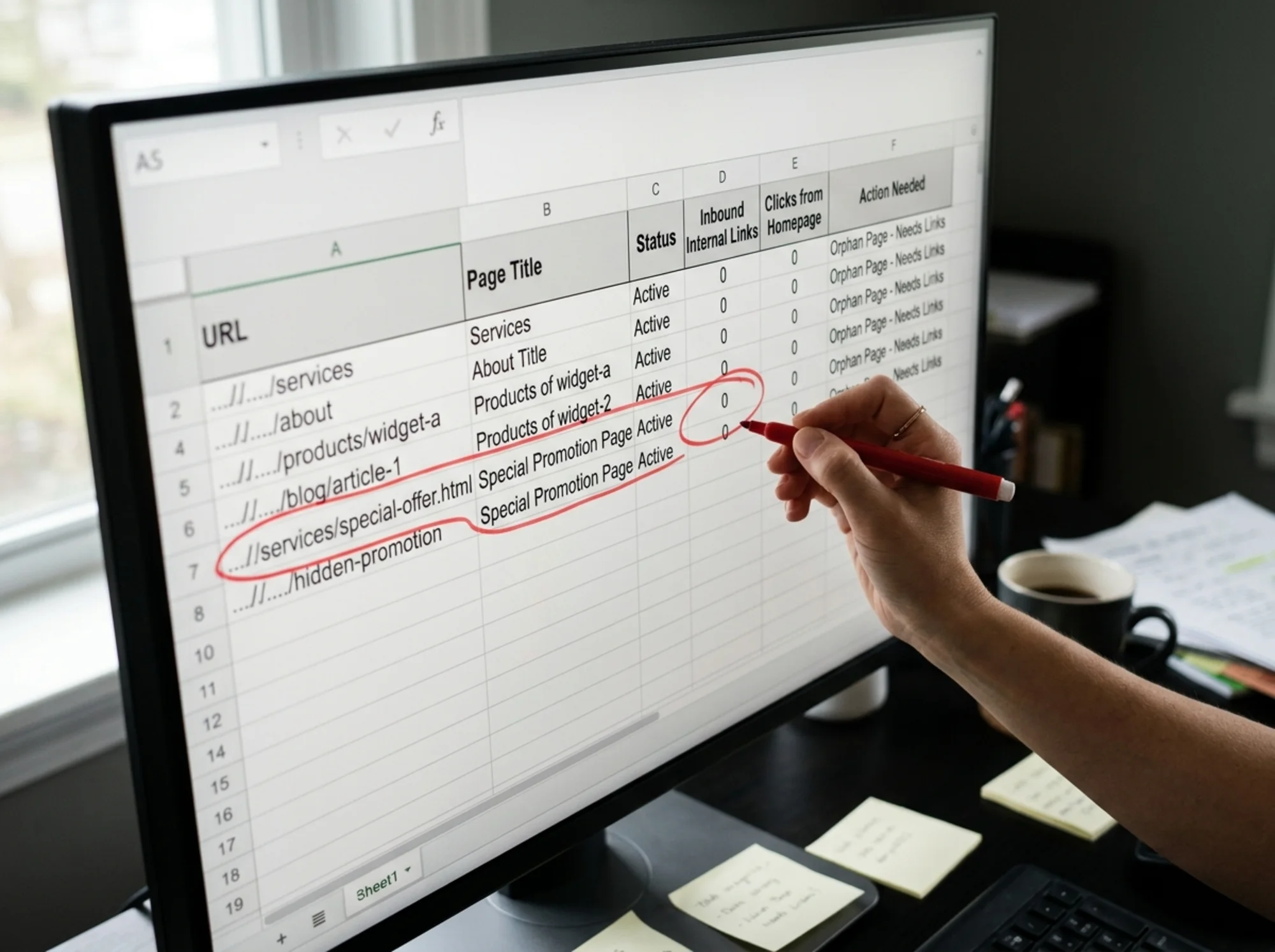
Put them all in a spreadsheet. One column: URL. That's it for now. A typical small business site has somewhere between 15 and 300 pages. If you have more than that and didn't know it, that's already a finding.
Step 2: Find orphan pages
For each URL, count how many other pages on your site link to it. Flag pages with zero or one inbound internal link.
Common patterns:
- An old "Spring 2024 Promotion" page nobody links to anymore.
- A service page someone built but forgot to add to the navigation.
- Blog posts only linked from the blog index, which itself is buried in the footer.
- A FAQ page only linked from a thank-you email.
These pages are doing nothing for you. Either give them links from relevant pages, redirect them somewhere useful, or remove them. If you need a head start, our orphan pages fix guide walks through how to triage them.

Step 3: Find broken internal links
This is the easy one. Broken internal links point to URLs that no longer exist on your site. Common causes:
- You changed a page URL and didn't update old links.
- You deleted a page but forgot it was linked from three blog posts.
- You moved platforms and the URL structure changed.
Every broken link is a tiny "this business isn't paying attention" signal. They add up. Fix them by updating the link or removing it. If lots of pages used to link to a deleted page that had real traffic, set up a 301 redirect to the closest equivalent. Our broken links checklist covers the common cases.
Step 4: Check link distribution to your important pages
Look at your money pages. For most small businesses these are:
- The homepage
- Top service or product category pages
- Pricing or "book a call" pages
- Local landing pages if you serve specific areas
- A few flagship blog posts that bring in traffic
Count how many internal links each has. If your highest-converting service page has three internal links and a random 2022 blog post has 40, something is off.
A rough rule of thumb:
- Top revenue pages: linked from at least 60% of relevant pages.
- Secondary pages: linked from each parent category and a few relevant supporting pages.
- Blog posts: linked from related posts, the blog index, and at least one main site page where it's contextually relevant.
You don't need fancy software. Open a few key pages, view source, search for href, and count unique links. Tedious for the first few, fast after that. Or use a free audit tool to do it in bulk.
Step 5: Pressure-test the structure against customer logic
This is the part most audits skip. Map your current navigation and ask: does this match how a real customer would look for what we sell?
Write down five things a customer might try to do on your site. For a local plumbing business:
- Find out if you fix tankless water heaters
- See pricing
- Confirm you cover their neighborhood
- Read a review or two
- Book a callout
Now click through your site. Can each one be done in three clicks or fewer from the homepage? If not, your structure has a problem that no amount of link-fixing will solve. You need to restructure.
A short walkthrough: a real-feeling example
Let's run a quick imaginary audit for a small store that sells handmade soap.
The site has:
- A homepage
- A shop page
- Eight product pages
- A "Wholesale" page
- A "Custom orders" page
- A blog with 22 posts
- An About page and a Contact page
The owner runs a crawl and finds:
- The Wholesale page has zero internal links. It exists because someone asked about it once, the owner built it, and then never linked it from anywhere. Orphan.
- Four blog posts link to product pages that were discontinued. Each is a 404.
- The Custom orders page is only linked from the footer. It's their highest-margin offering.
- Two product pages have 12 internal links each. The other six have one link each, from the shop page.
The fixes take about an hour:
- Add Wholesale to the main navigation under "About" and link to it from three blog posts about gifting and bulk orders.
- Update the four broken links to point to current product pages and add redirects from the old URLs.
- Add Custom orders to the main navigation. Link to it from every product page with anchor text like "Want something custom?".
- For each of the six under-linked product pages, add contextual links from the three or four blog posts that discuss the relevant scents or use cases.
That's the entire audit. No agency engagement. No new content. Just connecting what already exists.
Anchor text: stop saying "click here"
The text used to make a link tells search engines what the linked page is about. "Click here" tells them nothing. "Our tankless water heater repair service in Brooklyn" tells them exactly what's there.
A few quick rules:
- Use descriptive anchor text that matches what the linked page is about.
- Vary it slightly across pages so you're not using the exact same phrase every time.
- Avoid keyword-stuffing. Write the link the way you'd say it out loud.
- Don't link the same phrase to two different pages on the same page.
A mini-checklist you can run today
If you only do five things this week:
- [ ] Pull a list of every URL on your site.
- [ ] Identify any page with zero internal links pointing to it.
- [ ] Run a check for broken internal links and fix or redirect them.
- [ ] List your top three revenue pages and add three new internal links to each from relevant existing pages.
- [ ] Rewrite any anchor text that says "click here," "read more," or "learn more" to something descriptive.
About two hours of work for most sites, and it measurably helps both visitors and search rankings.

What good internal linking looks like in the wild
A well-linked small business site usually has these traits:
- The main navigation has between 4 and 7 top-level items, no more.
- Every page can be reached in three or fewer clicks from the homepage.
- Every blog post links to at least one product or service page where relevant.
- Every service page links to a few related services and a booking or contact page.
- The footer holds a clean secondary set of links — Privacy, Terms, Contact, About — not 40 random pages.
- There are no orphan pages. None.
This isn't aspirational. Plenty of small business sites already do this. The difference is intent.
Structure affects speed, too
Site structure doesn't only affect SEO. It affects how fast pages feel. A page buried five clicks deep behind a heavy mega-menu feels slow even if its raw load time is fine. Google's Core Web Vitals guidance treats how quickly something interactive appears as a real ranking and experience signal. Cleaner structure means lighter pages, simpler menus, and a faster feel for the visitor. Article structured data also benefits from being on a well-organized site, because search engines use both your content and your link structure to decide what to show.
When to restructure entirely
Sometimes a linking audit reveals that the problem isn't bad links — it's a bad structure. Signs it's time for a restructure rather than a tune-up:
- Services have been added one at a time over years with no logical grouping.
- Customers regularly ask questions that are answered on your site but couldn't find.
- Your navigation has more than 8 top-level items.
- You can't explain in one sentence what your site is about based on its current homepage.
Restructuring is more work, but the audit is the first step regardless. You can't redesign what you haven't mapped.
How FreeSiteAudit helps
Doing this by hand is fine, but slow. FreeSiteAudit crawls your site, lists every URL, flags orphan pages, identifies broken internal links, and shows you how internal links are distributed across your top pages. You get a plain-English report with the actual fixes, not a 400-page technical export.
You can run a free website audit right now without signing up for anything. If you want to spot-check a specific page first, our internal link checker does that too. For ecommerce stores, internal linking has an outsized effect on which products get found — see our specific guidance for ecommerce sites if that's you.
The bottom line
Internal linking is the most overlooked, lowest-cost, highest-leverage thing a small business can fix on their own website. It doesn't require new content, new design, or a developer. It requires an afternoon, a spreadsheet, and a willingness to look at your site the way a confused customer would.
Audit it once this quarter. Fix the obvious things. Look again in six months. That's the whole process.
Sources
- Google Search Central: Creating helpful, reliable, people-first content — https://developers.google.com/search/docs/fundamentals/creating-helpful-content
- Google Search Central: Article structured data — https://developers.google.com/search/docs/appearance/structured-data/article
- web.dev: Core Web Vitals — https://web.dev/articles/vitals
Check your website for free
Get an instant score and your top 3 critical issues in under 60 seconds.
Get Your Free Audit →